CenterPoint® Accounting for Agriculture
- Tax Form Preparation – Report Equipment Purchases & Sales
Related Help
_24.jpg) Printing and Previewing Reports Video - Duration: 12 min 52 sec
Printing and Previewing Reports Video - Duration: 12 min 52 sec
Customizing Reports Video - Duration: 16 min 18 sec
Report Favorites and Batch Reports Video - Duration: 9 min 50 sec

| Document #: | 3051 | Product: | CenterPoint® Accounting for Agriculture |
|---|
This document guides you through generating a list of your equipment purchases and sales during the year. This can be helpful as you prepare tax forms.
Generate the Report
- Select Reports > Reports > Transaction Reports > General Ledger > General Ledger Account Activity.
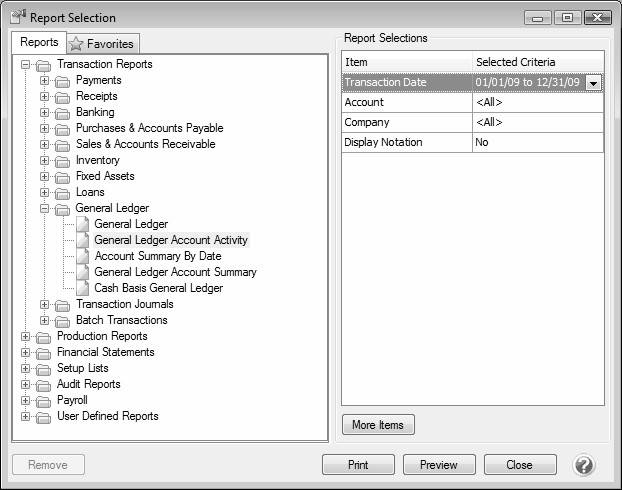
- In the Report Selections on the right, select the appropriate Transaction Date (normally this will be This Year or Last Year). Click OK.
- Click on More Items and select the boxes for Account Category and Entry Screen. Click OK.
- In the Report Selections select Account Category. All of your Account Types and Account Categories will be listed on the left in the Available section. Move any Account Categories that include fixed assets (for example, Machinery & Equipment, Buildings & Improvements, Vehicles, etc.) to the Selected Section using the green right-arrow button. Click OK.
- Select Entry Screen from the Report Selections. The Entry Screen options will be displayed in the Available section on the left. Select Depreciation and move it to the Selected section using the green right arrow. Click OK.
- Click Preview or Print to generate the report. The report will display all purchases and sales of fixed asset items.
- To save this report for future use, preview the report and click on the Star button to add it to your favorites.
|
Document: 3051 |
|---|
 See Also